


OVSICORI-UNA Alerta Terremotos
4.16.00 Reviews
App Specs
- Version
- V4.0.1cr_public
- Updated On
- License
- Free
- Downloads
- 100,000+
- Developer
- Billy Burgoa Rosso
- Categories
- Education
- Platform
- Android
Screenshots
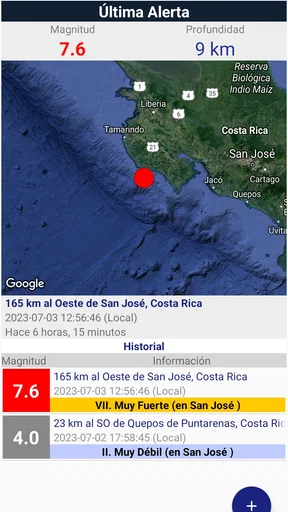

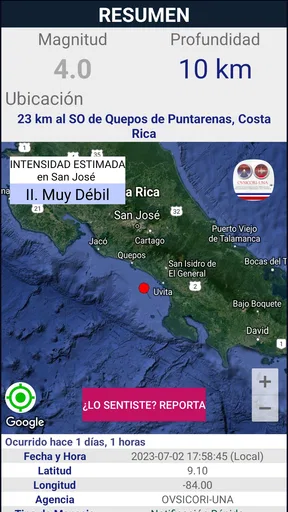
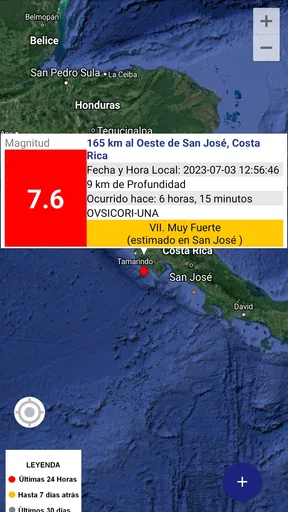
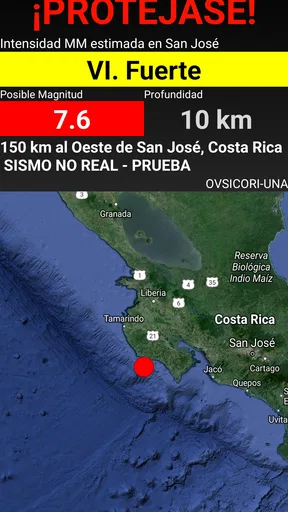
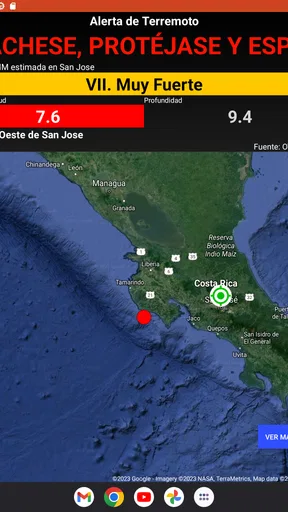
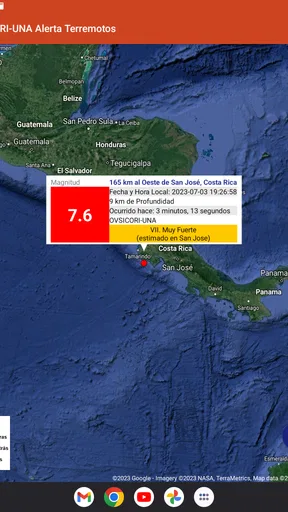
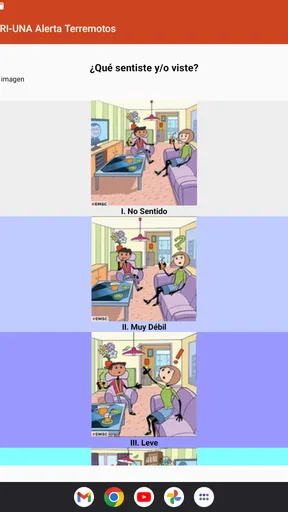
 Analysis by AppCompare
When an earthquake alert matters, the useful question is not whether an app looks impressive, but whether it can fit into the few seconds between receiving a warning and deciding what to do. I spent time looking at OVSICORI-UNA Alerta Terremotos with that practical standard in mind. It is a free education app from Billy Burgoa Rosso, built around alerts from the OVSICORI-UNA Early Warning System rather than around lessons, maps, or general earthquake news.
That focus makes it easier to understand, but it also sets a clear boundary. This is not a complete emergency-preparedness suite, and it should not be treated as a replacement for local authorities, household planning, or common sense during a tremor. Its value is more specific: it gives people a direct way to receive earthquake-related warnings through a system associated with OVSICORI-UNA. For users who live in, work in, or regularly travel through the area covered by that system, that narrow purpose can be more useful than a crowded disaster app.
How the everyday alert workflow feels
The simplest way to use the app is also the most sensible. Install it, open it before an emergency happens, review the available settings, and then leave it ready to deliver alerts. The important work happens before the earthquake: checking that the app is installed on the phone you actually carry, that the operating system is compatible, and that the phone can receive notifications in the situations where you need them.
I would not approach this as an app to browse every day. There is no reason to open it repeatedly just to feel prepared. A better routine is to check it after installation, revisit it when changing phones or notification habits, and include it in a wider emergency plan. That keeps the app in its proper role: a warning channel, not the entire plan.
The app is listed for everyone, which makes it approachable for families, older relatives, students, and people who are not especially comfortable with technical emergency tools. I like that positioning because earthquake warnings should not require specialist knowledge. Still, “easy to use” does not mean “set and forget forever.” Phones change notification behavior, battery-saving rules can affect background activity, and people often silence alerts without realizing it. A quick periodic check is a sensible habit.
One realistic scenario is a person working in a building while their phone is in a bag or on a desk. An alert may provide a moment to move away from windows, avoid elevators, protect the head, or follow the building’s own emergency procedure. The app cannot make those decisions for the user, and it cannot guarantee that every person will see an alert in time. Its practical contribution is to make the warning available through the phone, giving the user another opportunity to react.
That distinction is important. An alert is not a prediction, and receiving one does not tell me that every location will experience the same shaking or danger. I would use the notification as a prompt to apply established safety guidance, not as a reason to wait for more information or start searching through the app while the event is unfolding.
Worth Reading Before You Choose

EA SPORTS FC Mobile 26 Is a Bigger Football Game, but It Takes Time

Flipboard Shows What News Apps Must Do Beyond the Feed

Switching to Android Auto Means Rethinking Your Driving Routine

Google Calendar Makes a Crowded Week Easier to Manage

Ludo King Makes the Most of the Minutes Between Plans

Baby Panda World Brings Quick Play to Modern Phones, but Its Game Library Feels Busy
The first setup deserves more attention than it gets
After installing, I would open the app deliberately rather than assuming the installation itself completes the job. Look for the alert-related controls, read the wording carefully, and make sure the phone’s own notification behavior is not working against the app. If the device has a general “do not disturb” schedule, aggressive battery management, or a habit of suppressing background notifications, those settings deserve attention.
This is one of the less obvious lessons with warning apps: the app can be correctly installed and still be practically useless if the phone hides its messages. I would also avoid placing the phone permanently on silent if I depend on it for urgent notifications. The best configuration is not necessarily the loudest one, but it should be noticeable enough for the environment where I normally spend time.
For a family, I would set up the app on the phones people actually carry rather than relying on one shared device. A parent’s phone may be in another room, a student may be at school, and a worker may leave a personal phone in a locker. Multiple independent alert paths are more useful than one phone treated as a household alarm.
Settings worth checking before relying on alerts
The available app settings should be read in context with the phone’s settings. I would begin with notification permission and then check whether the operating system allows the app to notify normally. On some phones, battery-saving tools are especially aggressive with apps that are not opened often. Since this app is meant to work in the background, that is exactly the kind of system behavior worth reviewing.
I would also check notification sound, vibration, lock-screen visibility, and any focus mode that could silence alerts. The right choice depends on the user. Someone who works in a quiet office may prefer vibration, while someone who sleeps with the phone nearby may need an audible signal. Someone in a classroom should follow local rules and avoid assuming that an emergency app overrides them.
Another useful check is language and clarity. If a notification arrives during stress, I want to understand it immediately. I would read a few sample labels and make sure I know which part represents the warning and which part is general information. This is a small preparation step, but it reduces hesitation when the phone is suddenly displaying an unfamiliar message.
I would not interpret every phone permission or system prompt as evidence that the app is malfunctioning. Mobile operating systems increasingly ask users to decide how notifications, background activity, and battery use should work. The practical approach is to read each prompt, choose the option that supports timely alerts, and avoid granting unrelated access simply out of habit. The goal is reliable warning delivery, not maximum access.
Because the app runs on Android version 8.0 or later, compatibility should be checked before installing it on an older device. For most current phones, that requirement is unlikely to be a major obstacle, but it matters if someone is preparing a spare handset for an elderly relative or keeping an old phone as an emergency backup.
Faster patterns for people who want less friction
Experienced use is mostly about reducing the number of decisions made during an emergency. I would keep the app easy to find, make sure notifications appear on the lock screen in a readable form, and avoid burying the phone under a pile of muted alerts. If I use a smartwatch or another connected device, I would treat it as a convenience rather than assuming it will always reproduce every warning correctly.
A useful habit is to pair the alert with a short personal action list. Mine would be simple: move away from glass and unstable objects, protect my head, avoid elevators, and follow the building’s instructions. The app supplies the prompt; the list supplies the response. This is a stronger workflow than opening the notification and then trying to remember basic safety steps while the ground is moving.
For workplaces, I would recommend agreeing in advance on who checks official updates and who helps visitors or colleagues. The app should not become an excuse for everyone to stare at a phone. A warning is most useful when it triggers coordinated behavior, especially in offices, schools, shops, and public buildings where people may not know the exits.
There is also a simple travel use case. If I am visiting an area served by the OVSICORI-UNA Early Warning System, I would install and configure the app before the trip rather than during it. I would still learn the local emergency number, identify safe places, and ask the hotel or host about evacuation procedures. The alert can support that preparation, but it cannot replace local knowledge.
One trade-off is attention. If the app is one of many notification-heavy tools on the phone, important warnings can be lost in ordinary messages. I would reduce clutter where possible and keep emergency-related notifications visually distinct. That does not require changing every phone setting; it simply means treating the alert channel as something different from social updates and promotional notices.
Where the app is strong, and where its limits matter
The strongest part of this app is its focused purpose. Instead of trying to become a broad news reader, weather dashboard, preparedness course, and social feed at once, it centers on earthquake alerts from the OVSICORI-UNA Early Warning System. That directness is valuable to someone who wants a dedicated warning tool and does not want to sort through unrelated content.
Its educational category can also make it feel less intimidating than a technical monitoring application. I would recommend it to a resident who wants a straightforward connection to earthquake warnings, a family setting up basic preparedness habits, or a visitor who wants an additional source of timely notice while in the relevant region. The free price removes an obvious barrier, and the everyone age rating makes it suitable for broad household use.
The public response is encouraging without being a reason to stop thinking critically: it has a 4.1 average from around 1.2 thousand ratings, with over 100 thousand installs. I read those figures as evidence that the app has found a real audience, not as a guarantee that alerts will suit every phone, location, or network condition. A warning system is judged in difficult circumstances, and no app should be treated as infallible.
The main limitation is scope. If I want detailed seismic analysis, historical earthquake exploration, preparedness courses, weather warnings, or a unified emergency dashboard, I would look at a broader official or specialist alternative as well. Those tools may offer more context, while this app’s advantage is that it stays centered on its alert function. Choosing between them depends on whether I value a focused warning channel or a larger information package.
Another limitation is that phone-based alerts depend on the phone itself. A dead battery, weak connectivity, a muted device, or a user who is not carrying the phone can all reduce usefulness. That is not a criticism unique to this app, but it changes how I would deploy it. I would keep a charger or power bank available, avoid relying on one device for an entire household, and maintain non-digital safety habits.
I would also skip this app if I expected it to predict earthquakes, explain every tremor, or provide a complete step-by-step response during a crisis. It is not the right choice for someone seeking a full emergency-management platform. Likewise, if I live permanently outside the area relevant to OVSICORI-UNA, I would first confirm that the alerts are meaningful for my location before making the app part of my routine.
What the current release means in practice
The current version is V4.0.1cr_public, and the app was released on Jul 5, 2023. Those details matter mainly when troubleshooting or comparing the installation with what appears on a particular device. If the interface or notification behavior looks different after an update, I would check the app’s current settings again rather than assuming my original configuration still matches it.
I would also keep the app updated through the normal platform process, especially for a tool whose purpose depends on timely notifications. Updating is not a substitute for testing the phone’s notification behavior, but it is part of sensible maintenance. After an update, a quick review of permissions, notification visibility, and battery settings can prevent an unnoticed change from weakening the setup.
For older Android phones, the minimum operating-system requirement is worth checking before planning a family rollout. If a relative uses an unsupported device, I would not force the issue or assume that installing an unofficial file is a safe solution. A supported phone with clear notification settings is a better foundation than a workaround that introduces uncertainty.
My verdict after building a repeatable habit
I see OVSICORI-UNA Alerta Terremotos as a practical, narrowly focused education app that earns its place when the user understands what it does and prepares the phone properly. I appreciate that it is free, accessible to everyone, and connected to the OVSICORI-UNA Early Warning System. Its best quality is not a long feature list; it is the possibility of receiving a relevant warning without turning earthquake preparation into a complicated technical project.
My recommendation comes with a clear condition: use it as one layer of preparedness. Install it on the phones people carry, check the notification and battery settings, keep the device charged, and decide in advance what an alert should make you do. Those habits add more value than repeatedly opening the app and hoping it will handle the entire emergency.
For someone who wants a dedicated earthquake-alert channel in the OVSICORI-UNA context, I think it is worth trying. For someone looking for detailed seismic research, broad disaster coverage, or an all-in-one emergency organizer, another app or official resource may be a better companion. The right judgment is therefore not whether this app does everything. It is whether its focused warning role fits your location, your phone habits, and the safety plan you already have.
Pros
- Provides earthquake alerts from Costa Rica’s OVSICORI-UNA monitoring network.
- Useful for tracking local seismic activity and recent earthquake reports.
- Simple interface makes essential information quick to find.
- Can help users stay informed during periods of increased seismic activity.
- Official institutional source adds credibility to reported earthquake data.
Cons
- Its usefulness is mainly focused on Costa Rica and nearby regions.
- Alerts may depend on internet access
- device settings
- and notification permissions.
- Earthquake information can arrive after the event due to detection delays.
- Some technical seismic details may be difficult for casual users to understand.
- It should not replace official emergency instructions or a personal safety plan.
FAQs for OVSICORI-UNA Alerta Terremotos
What is OVSICORI-UNA Alerta Terremotos?
OVSICORI-UNA Alerta Terremotos is a Costa Rica-focused earthquake information app connected with the Observatorio Vulcanológico y Sismológico de Costa Rica at the Universidad Nacional. It is designed to provide access to reported seismic activity, including details such as approximate location, magnitude, depth, and time, helping users stay informed about earthquakes detected in and around the country.
Does the app provide real-time earthquake alerts?
The app is intended to display earthquake information as it becomes available from OVSICORI-UNA, but users should not treat it as an official life-safety warning system or assume that every earthquake will appear instantly. Detection, verification, internet connectivity, and notification settings can affect delivery time. During an emergency, follow instructions from Costa Rican authorities rather than waiting for an app notification.
Can OVSICORI-UNA Alerta Terremotos be used outside Costa Rica?
Although the application is primarily designed for people in Costa Rica and for monitoring seismic events reported by OVSICORI-UNA, it can also be useful to travelers, families, researchers, and anyone interested in earthquakes in the region. Its usefulness outside Costa Rica may depend on the coverage provided by the observatory and whether the displayed information includes events relevant to your location.
Does the application require an internet connection or location access?
An internet connection is generally necessary to download updated earthquake reports and receive current information from the service. Location access may be useful for presenting events in relation to your position, depending on the app’s configuration and version, but it should not be assumed that location permission is required for every feature. Review the requested permissions before installation and enable only those you consider appropriate.
Is OVSICORI-UNA Alerta Terremotos a replacement for emergency preparedness tools?
No. The application is best considered an information and monitoring tool, not a replacement for emergency services, official government alerts, evacuation instructions, or a personal preparedness plan. Earthquakes can occur without advance warning, and mobile notifications may be delayed or unavailable. Keep emergency contacts accessible, prepare supplies, learn safe actions during shaking, and follow guidance from local authorities.


